$node = stdClass Object (
[nid] => [2660]
[vid] => [2660]
[type] => [page]
[status] => [1]
[created] => [1234549115]
[changed] => [1296334414]
[comment] => [0]
[promote] => [0]
[sticky] => [0]
[revision_timestamp] => [1296334414]
[title] => [Stitches]
[body] => [<div style="text-align: center">
<img src="/files/images/nowigetit_header.gif" height="54" width="675" />
</div>
<table height="194" width="673" border="0">
<tbody>
<tr>
<td align="center">
<div align="left">
</div>
<p align="left">
I'll make this easy on you. So many embroidery diagrams left me
scratching my head. As a complete newbie to embroidery, and someone who never sewed, I just couldn't follow all the twist and turns. But, I do now! So, I've illustrated some of my favorite starting
stitches in a way that should make them utterly understandable.
</p>
<div align="left">
</div>
<p align="left">
<b>"1" indicates where the needle first comes up through the fabric
(you'll start from behind the hoop), "2" means where it is brought down
again and so on.</b> Let's sew on.
</p>
<div align="left">
</div>
<div align="center">
</div>
<p align="center">
These stitching diagrams (and instructions) come in each of my <a href="/ultimatekit.html">Embroidery Kits</a>, and there are even more diagrams in <a href="/books.html">my books</a>.<br />
<br />
Don't get overwhelmed! Start with these basic and most-oftenly-used stitches, and see where it takes you.
</p>
<p align="center">
x-x-x, Jenny ♥
</p>
<p>
</p>
<p align="center">
</p>
</td>
<td align="center">
<p>
<img src="/files/images/righthand_stitching.gif" height="147" width="237" />
</p>
<p>
</p>
<p align="center">
<b><a href="#Split%20Stitch">SPLIT</a> - <a href="#Stem%20Stitch">STEM</a> - <a href="#Back%20Stitch">BACK</a> - <a href="#Chain%20Stitch">CHAIN<br />
</a></b>
</p>
<p>
<b><a href="/frenchknot.html">FRENCH KNOT</a></b>
- <b><a href="/satinstitch.html">SATIN</a></b>
</p>
<p>
<a href="/lazylotus.html"><b>LAZY LOTUS</b></a>
</p>
<p>
<b>~ <a href="/stitchesforlefties">DIAGRAMS FOR LEFTIES</a> ~</b>
</p>
<br />
</td>
</tr>
</tbody>
</table>
<br />
<div align="center">
<img src="/files/images/divider_0.gif" height="41" width="510" />
</div>
<table height="178" width="600" border="0">
<tbody>
<tr>
<td align="center">
<p>
</p>
<p>
<b><a title="Split Stitch" name="Split Stitch"></a>SPLIT STITCH</b>
</p>
<p>
Make a small stitch (1-2)
and bring your needle up through the center of the previous stitch (3)
as you make your next one. You will need to work with a <a href="/mega_palette.html">divisible floss</a> (at least four strands) so you can split them. Continue along pattern line. That’s it!
Looks impressive, but is super simple! (This is also the first stitch I
learned, and the one I use the most).<br />
</p>
<p>
</p>
<p>
</p>
</td>
<td align="center">
<p>
<img src="/files/images/split_copyright_2001_HART.jpg" height="144" width="297" />
</p>
<p>
</p>
</td>
</tr>
</tbody>
</table>
<div align="center">
<img src="/files/images/divider_0.gif" height="41" width="510" />
</div>
<table height="150" width="600" border="0">
<tbody>
<tr>
<td align="center">
<p>
<b><a title="Stem Stitch" name="Stem Stitch"></a>STEM STITCH</b>
</p>
<p>
Work this almost like
the stitch we just learned (split stitch, above). The difference?
Instead of splitting the previous stitch, come up beside it. Repeat
with your following stitches, working at a slight diagonal across your line, and keeping to the same
side of your stitches (you can choose which side that will be). This
stitch is great for curvy lines like vines and plant stems. <br />
(Maybe that’s why it’s called a stem stitch? Ya think?)
</p>
<p>
</p>
</td>
<td align="center">
<p>
</p>
<p>
<img src="/files/images/stem_copyright_2001_HART.gif" height="144" width="297" />
</p>
<p>
</p>
<p>
</p>
</td>
</tr>
</tbody>
</table>
<div align="center">
<img src="/files/images/divider_0.gif" height="41" width="510" />
</div>
<table height="150" width="600" border="0">
<tbody>
<tr>
<td align="center">
<p>
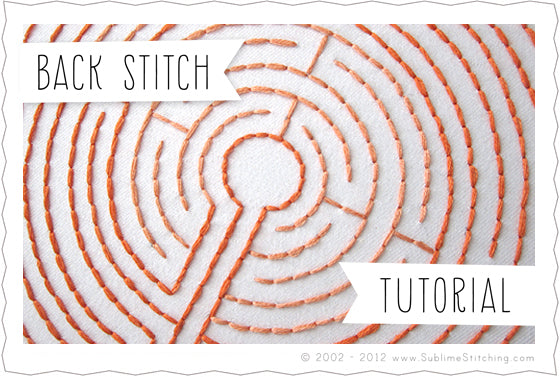
<b><a title="Back Stitch" name="Back Stitch"></a>BACK STITCH</b>
</p>
<p>
Give this simple stitch a try! Also called a “seed stitch”, it’s a
cinch to work. Make a single, straight stitch (1-2). Continue along
your pattern line, but come up a space ahead (3) and bring your needle
back down into the same hole at the end of the last stitch you made.
Get it? You are bringing your stitch back to the end of the last one
you just made. Now you know what to do to make a neat, clean line, and
create a crisp corner -use this stitch whenever your pattern makes a
quick turn, even if you’re working in another stitch. Helpful.
</p>
</td>
<td align="center">
<p>
</p>
<p>
<img src="/files/images/back_copyright_2001_HART.gif" height="216" width="297" />
</p>
<br />
</td>
</tr>
</tbody>
</table>
<div style="text-align: center">
<img src="/files/images/divider_0.gif" height="41" width="510" />
</div>
<table height="150" width="600" border="0">
<tbody>
<tr>
<td align="center">
<p>
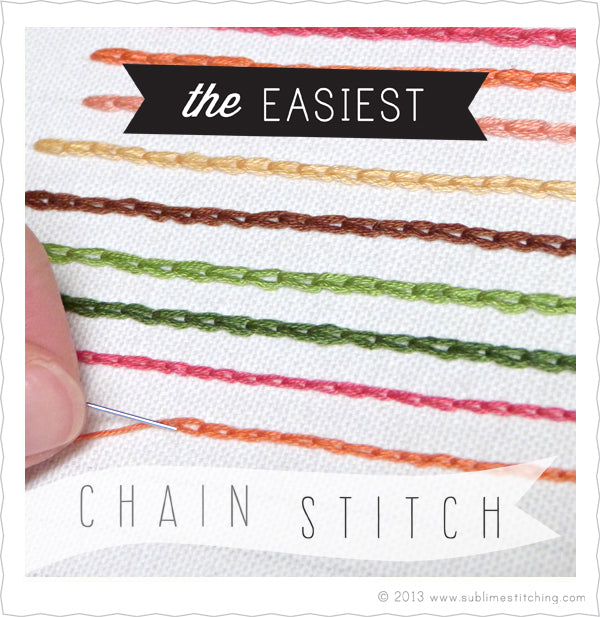
<b><a title="Chain Stitch" name="Chain Stitch"></a>CHAIN STITCH<br />
</b>
</p>
<p>
Come up at 1 and reinsert the tip of your needle just next to (2), or
in the same opening at 1. Not so fast! Before you pull the stitch all
the way through, leave an extra loop of floss on the topside of your
fabric. Now, bring your needle back up through the fabric again (in the
direction of your pattern line), and pass the tip of the needle inside
the loop of floss you made. Continue and repeat, always pulling down
the little loop of the previous stitch.
</p>
<p>
(This version is a little different from the traditional way of working a chain stitch, but that's okay!)
</p>
</td>
<td align="center">
<p>
<img src="/files/images/chain_copyright_2001_HART.gif" height="216" width="297" />
</p>
</td>
</tr>
</tbody>
</table>
<div style="text-align: center">
<img src="/files/images/divider_0.gif" height="41" width="510" />
</div>
<div style="text-align: center">
</div>
<div style="text-align: center">
</div>
<div style="text-align: center">
Need <a href="/ultimatekit.html" target="_blank">a kit to get you stitching</a>?
</div>
<div align="center">
<h5><span>All text and illustrations by Jenny Hart © 2001-2011 Sublime Stitching ® LLC. All rights reserved.
<br />
Please don't use my instructions and illustrations without written permission. I worked really hard on them.<br />
</span></h5>
</div>
]
[teaser] => [ <div style="text-align: center">
<img src="/files/images/nowigetit_header.gif" height="54" width="675" />
</div>
<table height="194" width="673" border="0">
<tbody>
<tr>
<td align="center">
<div align="left">
</div>
<p align="left">
I'll make this easy on you. So many <a class="glossary-term" href="/glossary/term/80"><abbr title="Embroidery can be so, so many things. This is the alpha term for most of the decorative needlearts. ‘Embroidery’ just means any kind of decorative stitching, which can include an endless variety of styles. If you make decorative stitches on fabric, you’re embroidering. You can work in any media on any surface in a free-form manner, along a pattern, or simply by repeating a stitch along a hem or cuff, or edge of a tablecloth. There are endless combinations of stitches and possibilities. Sublime Stitching patterns are designed for embroidery but can be used as templates for other kinds of embroidery as well. Other types of embroidery make use of specific tools and materials, and then earn new and unique names. ">embroidery</abbr></a> diagrams left me
scratching my head. As a complete newbie to embroidery, and someone who never sewed, I just couldn't follow all the twist and turns. But, I do now! So, I've illustrated some of my favorite starting
stitches in a way that should make them utterly understandable.
</p>
<div align="left">
</div>
<p align="left">
<b>"1" indicates where the needle first comes up through the fabric
(you'll start from behind the hoop), "2" means where it is brought down
again and so on.</b> Let's sew on.
</p>
<div align="left">
</div>
<div align="center">
</div>
<p align="center">
These stitching diagrams (and instructions) come in each of my <a href="/ultimatekit.html">Embroidery Kits</a>, and there are even more diagrams in <a href="/books.html">my books</a>.<br />
<br />
Don't get overwhelmed! Start with these basic and most-oftenly-used stitches, and see where it takes you.
</p>
<p align="center">
x-x-x, Jenny ♥
</p>
<p>
</p>
<p align="center">
</p>
</td>
<td align="center">
<p>
<img src="/files/images/righthand_stitching.gif" height="147" width="237" />
</p>
<p>
</p>
<p align="center">
<b><a href="#Split%20Stitch">SPLIT</a> - <a href="#Stem%20Stitch">STEM</a> - <a href="#Back%20Stitch">BACK</a> - <a href="#Chain%20Stitch">CHAIN<br />
</a></b>
</p>
<p>
<b><a href="/frenchknot.html">FRENCH KNOT</a></b>
- <b><a href="/satinstitch.html">SATIN</a></b>
</p>
<p>
<a href="/lazylotus.html"><b>LAZY LOTUS</b></a>
</p>
<p>
<b>~ <a href="/stitchesforlefties">DIAGRAMS FOR LEFTIES</a> ~</b>
</p>
<br />
</td>
</tr>
</tbody>
</table>
<br />
<div align="center">
<img src="/files/images/divider_0.gif" height="41" width="510" />
</div>
<table height="178" width="600" border="0">
<tbody>
<tr>
<td align="center">
<p>
</p>
<p>
<b><a title="Split Stitch" name="Split Stitch"></a>SPLIT STITCH</b>
</p>
<p>
Make a small stitch (1-2)
and bring your needle up through the center of the previous stitch (3)
as you make your next one. You will need to work with a <a href="/mega_palette.html">divisible floss</a> (at least four strands) so you can split them. Continue along pattern line. That’s it!
Looks impressive, but is super simple! (This is also the first stitch I
learned, and the one I use the most).<br />
</p>
<p>
</p>
<p>
</p>
</td>
<td align="center">
<p>
<img src="/files/images/split_copyright_2001_HART.jpg" height="144" width="297" />
</p>
<p>
</p>
</td>
</tr>
</tbody>
</table>
<div align="center">
<img src="/files/images/divider_0.gif" height="41" width="510" />
</div>
<table height="150" width="600" border="0">
<tbody>
<tr>
<td align="center">
<p>
<b><a title="Stem Stitch" name="Stem Stitch"></a>STEM STITCH</b>
</p>
<p>
Work this almost like
the stitch we just learned (split stitch, above). The difference?
Instead of splitting the previous stitch, come up beside it. Repeat
with your following stitches, working at a slight diagonal across your line, and keeping to the same
side of your stitches (you can choose which side that will be). This
stitch is great for curvy lines like vines and plant stems. <br />
(Maybe that’s why it’s called a stem stitch? Ya think?)
</p>
<p>
</p>
</td>
<td align="center">
<p>
</p>
<p>
<img src="/files/images/stem_copyright_2001_HART.gif" height="144" width="297" />
</p>
<p>
</p>
<p>
</p>
</td>
</tr>
</tbody>
</table>
<div align="center">
<img src="/files/images/divider_0.gif" height="41" width="510" />
</div>
<table height="150" width="600" border="0">
<tbody>
<tr>
<td align="center">
<p>
<b><a title="Back Stitch" name="Back Stitch"></a>BACK STITCH</b>
</p>
<p>
Give this simple stitch a try! Also called a “seed stitch”, it’s a
cinch to work. Make a single, straight stitch (1-2). Continue along
your pattern line, but come up a space ahead (3) and bring your needle
back down into the same hole at the end of the last stitch you made.
Get it? You are bringing your stitch back to the end of the last one
you just made. Now you know what to do to make a neat, clean line, and
create a crisp corner -use this stitch whenever your pattern makes a
quick turn, even if you’re working in another stitch. Helpful.
</p>
</td>
<td align="center">
<p>
</p>
<p>
<img src="/files/images/back_copyright_2001_HART.gif" height="216" width="297" />
</p>
<br />
</td>
</tr>
</tbody>
</table>
<div style="text-align: center">
<img src="/files/images/divider_0.gif" height="41" width="510" />
</div>
<table height="150" width="600" border="0">
<tbody>
<tr>
<td align="center">
<p>
<b><a title="Chain Stitch" name="Chain Stitch"></a>CHAIN STITCH<br />
</b>
</p>
<p>
Come up at 1 and reinsert the tip of your needle just next to (2), or
in the same opening at 1. Not so fast! Before you pull the stitch all
the way through, leave an extra loop of floss on the topside of your
fabric. Now, bring your needle back up through the fabric again (in the
direction of your pattern line), and pass the tip of the needle inside
the loop of floss you made. Continue and repeat, always pulling down
the little loop of the previous stitch.
</p>
<p>
(This version is a little different from the traditional way of working a chain stitch, but that's okay!)
</p>
</td>
<td align="center">
<p>
<img src="/files/images/chain_copyright_2001_HART.gif" height="216" width="297" />
</p>
</td>
</tr>
</tbody>
</table>
<div style="text-align: center">
<img src="/files/images/divider_0.gif" height="41" width="510" />
</div>
<div style="text-align: center">
</div>
<div style="text-align: center">
</div>
<div style="text-align: center">
Need <a href="/ultimatekit.html" target="_blank">a kit to get you stitching</a>?
</div>
<div align="center">
<h5><span>All text and illustrations by Jenny Hart © 2001-2011 Sublime Stitching ® LLC. All rights reserved.
<br />
Please don't use my instructions and illustrations without written permission. I worked really hard on them.<br />
</span></h5>
</div>
]
[log] => []
[format] => [4]
[uid] => [0]
[name] => []
[picture] => []
[data] => [a:4:{s:2:"op";s:18:"Create new account";s:6:"submit";s:18:"Create new account";s:7:"form_id";s:13:"user_register";s:7:"contact";i:0;}]
[search_block] => []
[nodewords] => []
[last_comment_timestamp] => [1234549115]
[last_comment_name] => []
[comment_count] => [0]
[taxonomy] => []
[files] => []
[readmore] => []
[content] => array (
[body] => array (
[#weight] => [0]
[#value] => [ <div style="text-align: center">
<img src="/files/images/nowigetit_header.gif" height="54" width="675" />
</div>
<table height="194" width="673" border="0">
<tbody>
<tr>
<td align="center">
<div align="left">
</div>
<p align="left">
I'll make this easy on you. So many <a class="glossary-term" href="/glossary/term/80"><abbr title="Embroidery can be so, so many things. This is the alpha term for most of the decorative needlearts. ‘Embroidery’ just means any kind of decorative stitching, which can include an endless variety of styles. If you make decorative stitches on fabric, you’re embroidering. You can work in any media on any surface in a free-form manner, along a pattern, or simply by repeating a stitch along a hem or cuff, or edge of a tablecloth. There are endless combinations of stitches and possibilities. Sublime Stitching patterns are designed for embroidery but can be used as templates for other kinds of embroidery as well. Other types of embroidery make use of specific tools and materials, and then earn new and unique names. ">embroidery</abbr></a> diagrams left me
scratching my head. As a complete newbie to embroidery, and someone who never sewed, I just couldn't follow all the twist and turns. But, I do now! So, I've illustrated some of my favorite starting
stitches in a way that should make them utterly understandable.
</p>
<div align="left">
</div>
<p align="left">
<b>"1" indicates where the needle first comes up through the fabric
(you'll start from behind the hoop), "2" means where it is brought down
again and so on.</b> Let's sew on.
</p>
<div align="left">
</div>
<div align="center">
</div>
<p align="center">
These stitching diagrams (and instructions) come in each of my <a href="/ultimatekit.html">Embroidery Kits</a>, and there are even more diagrams in <a href="/books.html">my books</a>.<br />
<br />
Don't get overwhelmed! Start with these basic and most-oftenly-used stitches, and see where it takes you.
</p>
<p align="center">
x-x-x, Jenny ♥
</p>
<p>
</p>
<p align="center">
</p>
</td>
<td align="center">
<p>
<img src="/files/images/righthand_stitching.gif" height="147" width="237" />
</p>
<p>
</p>
<p align="center">
<b><a href="#Split%20Stitch">SPLIT</a> - <a href="#Stem%20Stitch">STEM</a> - <a href="#Back%20Stitch">BACK</a> - <a href="#Chain%20Stitch">CHAIN<br />
</a></b>
</p>
<p>
<b><a href="/frenchknot.html">FRENCH KNOT</a></b>
- <b><a href="/satinstitch.html">SATIN</a></b>
</p>
<p>
<a href="/lazylotus.html"><b>LAZY LOTUS</b></a>
</p>
<p>
<b>~ <a href="/stitchesforlefties">DIAGRAMS FOR LEFTIES</a> ~</b>
</p>
<br />
</td>
</tr>
</tbody>
</table>
<br />
<div align="center">
<img src="/files/images/divider_0.gif" height="41" width="510" />
</div>
<table height="178" width="600" border="0">
<tbody>
<tr>
<td align="center">
<p>
</p>
<p>
<b><a title="Split Stitch" name="Split Stitch"></a>SPLIT STITCH</b>
</p>
<p>
Make a small stitch (1-2)
and bring your needle up through the center of the previous stitch (3)
as you make your next one. You will need to work with a <a href="/mega_palette.html">divisible floss</a> (at least four strands) so you can split them. Continue along pattern line. That’s it!
Looks impressive, but is super simple! (This is also the first stitch I
learned, and the one I use the most).<br />
</p>
<p>
</p>
<p>
</p>
</td>
<td align="center">
<p>
<img src="/files/images/split_copyright_2001_HART.jpg" height="144" width="297" />
</p>
<p>
</p>
</td>
</tr>
</tbody>
</table>
<div align="center">
<img src="/files/images/divider_0.gif" height="41" width="510" />
</div>
<table height="150" width="600" border="0">
<tbody>
<tr>
<td align="center">
<p>
<b><a title="Stem Stitch" name="Stem Stitch"></a>STEM STITCH</b>
</p>
<p>
Work this almost like
the stitch we just learned (split stitch, above). The difference?
Instead of splitting the previous stitch, come up beside it. Repeat
with your following stitches, working at a slight diagonal across your line, and keeping to the same
side of your stitches (you can choose which side that will be). This
stitch is great for curvy lines like vines and plant stems. <br />
(Maybe that’s why it’s called a stem stitch? Ya think?)
</p>
<p>
</p>
</td>
<td align="center">
<p>
</p>
<p>
<img src="/files/images/stem_copyright_2001_HART.gif" height="144" width="297" />
</p>
<p>
</p>
<p>
</p>
</td>
</tr>
</tbody>
</table>
<div align="center">
<img src="/files/images/divider_0.gif" height="41" width="510" />
</div>
<table height="150" width="600" border="0">
<tbody>
<tr>
<td align="center">
<p>
<b><a title="Back Stitch" name="Back Stitch"></a>BACK STITCH</b>
</p>
<p>
Give this simple stitch a try! Also called a “seed stitch”, it’s a
cinch to work. Make a single, straight stitch (1-2). Continue along
your pattern line, but come up a space ahead (3) and bring your needle
back down into the same hole at the end of the last stitch you made.
Get it? You are bringing your stitch back to the end of the last one
you just made. Now you know what to do to make a neat, clean line, and
create a crisp corner -use this stitch whenever your pattern makes a
quick turn, even if you’re working in another stitch. Helpful.
</p>
</td>
<td align="center">
<p>
</p>
<p>
<img src="/files/images/back_copyright_2001_HART.gif" height="216" width="297" />
</p>
<br />
</td>
</tr>
</tbody>
</table>
<div style="text-align: center">
<img src="/files/images/divider_0.gif" height="41" width="510" />
</div>
<table height="150" width="600" border="0">
<tbody>
<tr>
<td align="center">
<p>
<b><a title="Chain Stitch" name="Chain Stitch"></a>CHAIN STITCH<br />
</b>
</p>
<p>
Come up at 1 and reinsert the tip of your needle just next to (2), or
in the same opening at 1. Not so fast! Before you pull the stitch all
the way through, leave an extra loop of floss on the topside of your
fabric. Now, bring your needle back up through the fabric again (in the
direction of your pattern line), and pass the tip of the needle inside
the loop of floss you made. Continue and repeat, always pulling down
the little loop of the previous stitch.
</p>
<p>
(This version is a little different from the traditional way of working a chain stitch, but that's okay!)
</p>
</td>
<td align="center">
<p>
<img src="/files/images/chain_copyright_2001_HART.gif" height="216" width="297" />
</p>
</td>
</tr>
</tbody>
</table>
<div style="text-align: center">
<img src="/files/images/divider_0.gif" height="41" width="510" />
</div>
<div style="text-align: center">
</div>
<div style="text-align: center">
</div>
<div style="text-align: center">
Need <a href="/ultimatekit.html" target="_blank">a kit to get you stitching</a>?
</div>
<div align="center">
<h5><span>All text and illustrations by Jenny Hart © 2001-2011 Sublime Stitching ® LLC. All rights reserved.
<br />
Please don't use my instructions and illustrations without written permission. I worked really hard on them.<br />
</span></h5>
</div>
]
[#printed] => [1]
)
[#children] => [ <div style="text-align: center">
<img src="/files/images/nowigetit_header.gif" height="54" width="675" />
</div>
<table height="194" width="673" border="0">
<tbody>
<tr>
<td align="center">
<div align="left">
</div>
<p align="left">
I'll make this easy on you. So many <a class="glossary-term" href="/glossary/term/80"><abbr title="Embroidery can be so, so many things. This is the alpha term for most of the decorative needlearts. ‘Embroidery’ just means any kind of decorative stitching, which can include an endless variety of styles. If you make decorative stitches on fabric, you’re embroidering. You can work in any media on any surface in a free-form manner, along a pattern, or simply by repeating a stitch along a hem or cuff, or edge of a tablecloth. There are endless combinations of stitches and possibilities. Sublime Stitching patterns are designed for embroidery but can be used as templates for other kinds of embroidery as well. Other types of embroidery make use of specific tools and materials, and then earn new and unique names. ">embroidery</abbr></a> diagrams left me
scratching my head. As a complete newbie to embroidery, and someone who never sewed, I just couldn't follow all the twist and turns. But, I do now! So, I've illustrated some of my favorite starting
stitches in a way that should make them utterly understandable.
</p>
<div align="left">
</div>
<p align="left">
<b>"1" indicates where the needle first comes up through the fabric
(you'll start from behind the hoop), "2" means where it is brought down
again and so on.</b> Let's sew on.
</p>
<div align="left">
</div>
<div align="center">
</div>
<p align="center">
These stitching diagrams (and instructions) come in each of my <a href="/ultimatekit.html">Embroidery Kits</a>, and there are even more diagrams in <a href="/books.html">my books</a>.<br />
<br />
Don't get overwhelmed! Start with these basic and most-oftenly-used stitches, and see where it takes you.
</p>
<p align="center">
x-x-x, Jenny ♥
</p>
<p>
</p>
<p align="center">
</p>
</td>
<td align="center">
<p>
<img src="/files/images/righthand_stitching.gif" height="147" width="237" />
</p>
<p>
</p>
<p align="center">
<b><a href="#Split%20Stitch">SPLIT</a> - <a href="#Stem%20Stitch">STEM</a> - <a href="#Back%20Stitch">BACK</a> - <a href="#Chain%20Stitch">CHAIN<br />
</a></b>
</p>
<p>
<b><a href="/frenchknot.html">FRENCH KNOT</a></b>
- <b><a href="/satinstitch.html">SATIN</a></b>
</p>
<p>
<a href="/lazylotus.html"><b>LAZY LOTUS</b></a>
</p>
<p>
<b>~ <a href="/stitchesforlefties">DIAGRAMS FOR LEFTIES</a> ~</b>
</p>
<br />
</td>
</tr>
</tbody>
</table>
<br />
<div align="center">
<img src="/files/images/divider_0.gif" height="41" width="510" />
</div>
<table height="178" width="600" border="0">
<tbody>
<tr>
<td align="center">
<p>
</p>
<p>
<b><a title="Split Stitch" name="Split Stitch"></a>SPLIT STITCH</b>
</p>
<p>
Make a small stitch (1-2)
and bring your needle up through the center of the previous stitch (3)
as you make your next one. You will need to work with a <a href="/mega_palette.html">divisible floss</a> (at least four strands) so you can split them. Continue along pattern line. That’s it!
Looks impressive, but is super simple! (This is also the first stitch I
learned, and the one I use the most).<br />
</p>
<p>
</p>
<p>
</p>
</td>
<td align="center">
<p>
<img src="/files/images/split_copyright_2001_HART.jpg" height="144" width="297" />
</p>
<p>
</p>
</td>
</tr>
</tbody>
</table>
<div align="center">
<img src="/files/images/divider_0.gif" height="41" width="510" />
</div>
<table height="150" width="600" border="0">
<tbody>
<tr>
<td align="center">
<p>
<b><a title="Stem Stitch" name="Stem Stitch"></a>STEM STITCH</b>
</p>
<p>
Work this almost like
the stitch we just learned (split stitch, above). The difference?
Instead of splitting the previous stitch, come up beside it. Repeat
with your following stitches, working at a slight diagonal across your line, and keeping to the same
side of your stitches (you can choose which side that will be). This
stitch is great for curvy lines like vines and plant stems. <br />
(Maybe that’s why it’s called a stem stitch? Ya think?)
</p>
<p>
</p>
</td>
<td align="center">
<p>
</p>
<p>
<img src="/files/images/stem_copyright_2001_HART.gif" height="144" width="297" />
</p>
<p>
</p>
<p>
</p>
</td>
</tr>
</tbody>
</table>
<div align="center">
<img src="/files/images/divider_0.gif" height="41" width="510" />
</div>
<table height="150" width="600" border="0">
<tbody>
<tr>
<td align="center">
<p>
<b><a title="Back Stitch" name="Back Stitch"></a>BACK STITCH</b>
</p>
<p>
Give this simple stitch a try! Also called a “seed stitch”, it’s a
cinch to work. Make a single, straight stitch (1-2). Continue along
your pattern line, but come up a space ahead (3) and bring your needle
back down into the same hole at the end of the last stitch you made.
Get it? You are bringing your stitch back to the end of the last one
you just made. Now you know what to do to make a neat, clean line, and
create a crisp corner -use this stitch whenever your pattern makes a
quick turn, even if you’re working in another stitch. Helpful.
</p>
</td>
<td align="center">
<p>
</p>
<p>
<img src="/files/images/back_copyright_2001_HART.gif" height="216" width="297" />
</p>
<br />
</td>
</tr>
</tbody>
</table>
<div style="text-align: center">
<img src="/files/images/divider_0.gif" height="41" width="510" />
</div>
<table height="150" width="600" border="0">
<tbody>
<tr>
<td align="center">
<p>
<b><a title="Chain Stitch" name="Chain Stitch"></a>CHAIN STITCH<br />
</b>
</p>
<p>
Come up at 1 and reinsert the tip of your needle just next to (2), or
in the same opening at 1. Not so fast! Before you pull the stitch all
the way through, leave an extra loop of floss on the topside of your
fabric. Now, bring your needle back up through the fabric again (in the
direction of your pattern line), and pass the tip of the needle inside
the loop of floss you made. Continue and repeat, always pulling down
the little loop of the previous stitch.
</p>
<p>
(This version is a little different from the traditional way of working a chain stitch, but that's okay!)
</p>
</td>
<td align="center">
<p>
<img src="/files/images/chain_copyright_2001_HART.gif" height="216" width="297" />
</p>
</td>
</tr>
</tbody>
</table>
<div style="text-align: center">
<img src="/files/images/divider_0.gif" height="41" width="510" />
</div>
<div style="text-align: center">
</div>
<div style="text-align: center">
</div>
<div style="text-align: center">
Need <a href="/ultimatekit.html" target="_blank">a kit to get you stitching</a>?
</div>
<div align="center">
<h5><span>All text and illustrations by Jenny Hart © 2001-2011 Sublime Stitching ® LLC. All rights reserved.
<br />
Please don't use my instructions and illustrations without written permission. I worked really hard on them.<br />
</span></h5>
</div>
]
[#printed] => [1]
)
);